
On 17 November 2026, Google published a technical guide titled “Allow Google-Agent traffic”. It is aimed at the teams that manage a site's security. Yet the topic also concerns executives and marketing leads. If your site's security blocks Google-Agent, Google's AI agent will be unable to do anything on your site, even if the site is very well optimised.
Google-Agent is not Googlebot. Googlebot reads your pages to file them in Google's index. Google-Agent acts on behalf of an internet user. It browses, searches, filters, opens a product page. It generally ignores the robots.txt file, the one that tells robots where they are allowed to go. The decision is therefore made elsewhere: in your site's security filters.
Here is what Google's documentation says, with two diagrams, 6 checks and what I would do on Monday morning. I have not tested anything on a real site. Everything comes from Google's documentation and the standard cited.
Key takeaways
Google classes Google-Agent among “user-triggered” tools. According to its documentation, these tools generally ignore robots.txt.
Google lists six causes of blocking. Among them: the order of security rules, “I'm not a robot” tests, per-address request caps and the blocking of large hosting providers.
The list of addresses published by Google contained 20 ranges (12 in IPv4, 8 in IPv6) when generated on 26 November 2026, based on my reading of the file.
The name “Google-Agent” alone proves nothing: any robot can write it. It must be cross-checked against the visitor's address, and against its signature when there is one.
Only some requests are signed. The absence of a signature therefore does not prove fraud.
Googlebot and Google-Agent: two different visitors
Google sorts its robots into three families, according to its overview page. Common crawlers (Googlebot is the example) always respect robots.txt. Special-case crawlers (like AdsBot) serve specific products. User-triggered fetchers are those where an internet user starts the retrieval of a page themselves. Google-Agent belongs to this third family.
Its official description fits in one sentence. It is the name used by agents hosted on Google's infrastructure to browse the web and act at a user's request. The page does not say which products use it. Google added it to its documentation on 20 March 2026, according to its changelog.
| Question | Googlebot | Google-Agent |
|---|---|---|
| Who triggers it? | Google, to index | A user, for a task |
| What does it do? | It reads pages | It browses, searches, filters, adds to cart, books |
| robots.txt | Respected | Generally ignored |
| Where is access decided? | In robots.txt and indexing | In the site's security filters |
A modern page rarely displays its results in one block. Prices, stock, search results and filters often load “behind the scenes”, through separate calls. For the agent to succeed, you must allow both the journey and those background calls. Allowing the home page without them is like opening the shop door while leaving the shelves empty.
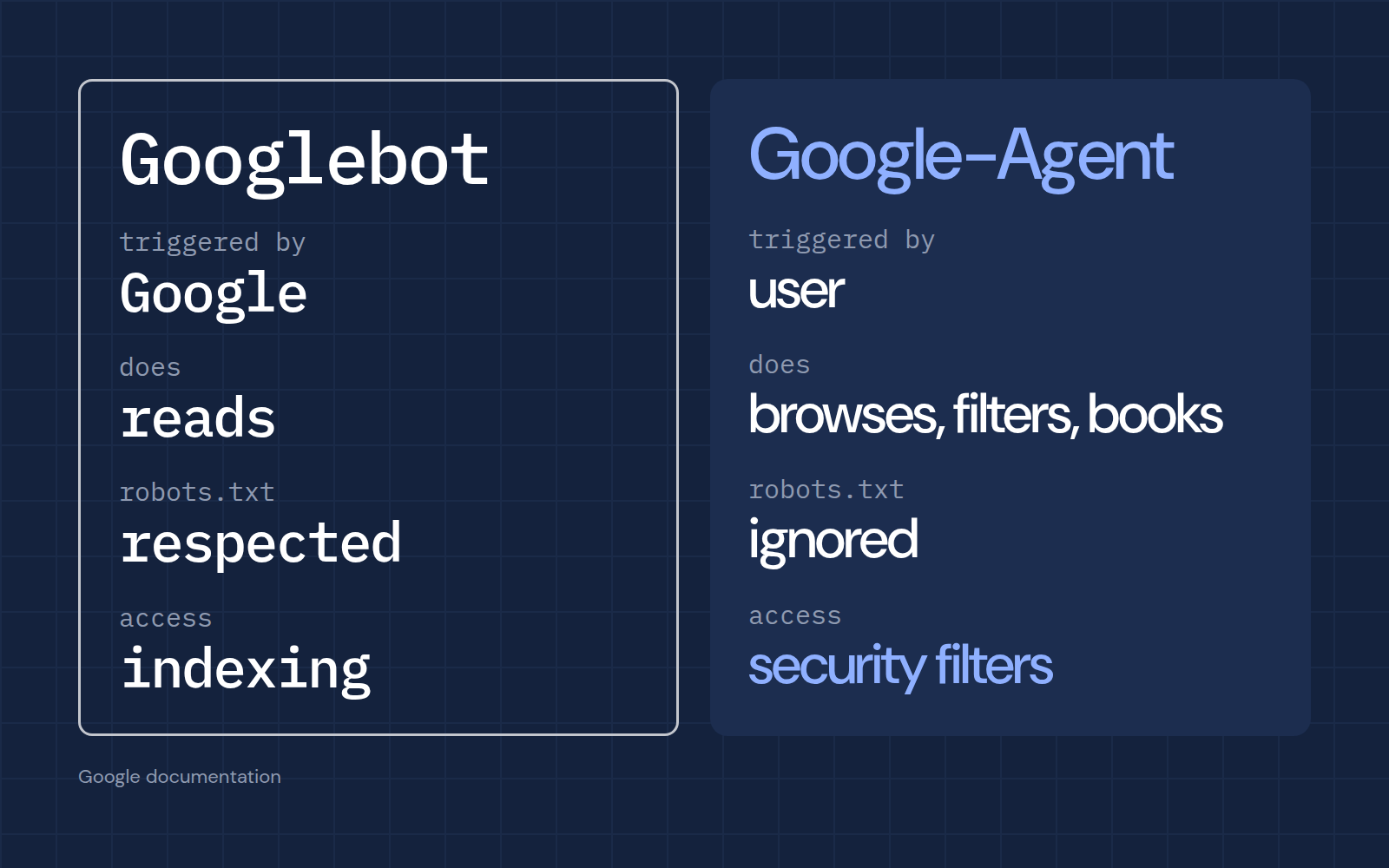
Why robots.txt no longer protects you, and does not help you either
Google's documentation is clear. The user asked for the page to be fetched. These tools therefore generally ignore robots.txt. A ban written in that file will not stop the agent from coming. A permission will not let it in if the site's security refuses it.
The guide explains how to let the agent in, not how to block it. In both cases, the decision is made at the site's entrance, in the security settings. It is a change of craft for SEO: the lever moves from a text file to technical configuration. If you already follow how AI agents work on the web, it is the same logic seen from the other side. The agent needs a clear path.
The path of a request, and where it gets blocked
Imagine a user asks the agent: “find me running shoes under €100 and add them to the cart”. The agent's request goes through several protections before reaching your site. Each one can say no.
A few useful terms for what follows:
The CDN is the service that delivers your site from servers close to the visitor.
The WAF is the site's firewall.
Anti-bot is the filter that sorts human visitors from robots.
The IP address is the visitor's address on the internet.
Two traps deserve a closer look, because they are counter-intuitive.
Blocking large hosting providers
Many sites automatically refuse addresses coming from the big hosting providers, to protect themselves from malicious robots. Technically, they block the “network of origin of the address” (its ASN). But Google-Agent runs on Google's servers. A “block hosting providers” rule can therefore reject it. Google cites this case among the common causes of blocking.
The “AI agents” category that wins out
Some security tools offer to block an “AI agents” category with one click. They also offer a “verified bots allowed” option. Google points out that blocking by category can override that option. You may therefore believe the agent is allowed when a broader rule stops it first.
Google's 6-point checklist, in plain terms
Here are the six checks from Google's guide. Each one is a question to put to your technical team or your provider.
| # | Check | The question to ask |
|---|---|---|
| 1 | Rule order | Does the “allow Google-Agent” rule come before the broad blocks (hosting providers, tool-managed bots, AI agents category)? |
| 2 | “I'm not a robot” tests | Do verified requests escape them, including on search and form submission? |
| 3 | The full journey | Do search, filters, product pages, cart, booking and background calls all go through? |
| 4 | Request caps | Do they take into account that several users share the same exit addresses? |
| 5 | Up-to-date address list | Do your rules follow the latest version of the file published by Google? |
| 6 | Intermediaries | Do your relay servers pass on the original address and the visitor's name, without erasing anything? |
A word on number 5. I opened the file on 27 November 2026. Its creation date is 26 November 2026 and it contains 20 address ranges. That number may change. A rule that copies the addresses by hand quietly becomes wrong. It is better to automate the update.
For your technical team
Point 1: the allow rule must be evaluated before cloud or datacenter ASN blocks, managed-bot rules and the “AI agents” category.
Point 2: exempt verified requests from CAPTCHAs and JavaScript tests, including those triggered on search or form submission.
Point 3: cover the XHR, GraphQL and api.* calls that feed the journey.
Point 4: per-IP rate limits must take the shared egress IP pool into account.
Point 5: wire the rules to user-triggered-agents.json (20 prefixes as of 26 November 2026: 12 IPv4, 8 IPv6). Google's changelog also reports, on 23 November, a User-Agent string change on another tool (APIs-Google). If your code hard-codes strings, review it.
Point 6: proxies and load balancers must preserve the original IP, the User-Agent and, for signed requests, the Signature, Signature-Input and Signature-Agent headers.
Verifying identity: the name alone is not enough
Google warns that the name a visitor displays (its User-Agent) can be spoofed. Any script can announce itself as “Google-Agent”. If you let through everything that carries that name, you open the door to unwanted robots.
The guide first recommends using your provider's native verification (CDN, firewall, anti-bot), if it exists. Failing that, it proposes four steps. Check whether the name contains “Google-Agent”. Verify that the visitor's address appears in the list published by Google. Check the signature if one is provided. Finally, exempt requests verified this way from the “I'm not a robot” test.
The signature, in plain terms
The signature is a digital stamp the robot adds to its request. You can verify it with public keys that Google publishes online. Google is experimenting with it for some of its agents. Only some requests are signed. Google writes it itself: “We don’t sign every request of a particular agent”. Without a signature, keep the classic checks as a safety net: the visitor's address and name. Ask your provider whether its native verification already handles them, before having it coded.
For your technical team
The protocol is called Web Bot Auth. It is experimental and still at draft stage at the IETF.
It relies on RFC 9421 (HTTP Message Signatures), published in February 2024. The signature is computed over selected components of the message. It uses two headers: Signature-Input (what is covered) and Signature (the value).
According to Google's Web Bot Auth page, a signed request carries a Signature-Agent header set to
g="https://agent.bot.goog".The public keys are retrieved from
agent.bot.goog/.well-known/http-message-signatures-directory. Respect the Cache-Control of that directory.Keep the classic checks (IP, reverse DNS, User-Agent), described in Google's page on verifying requests.
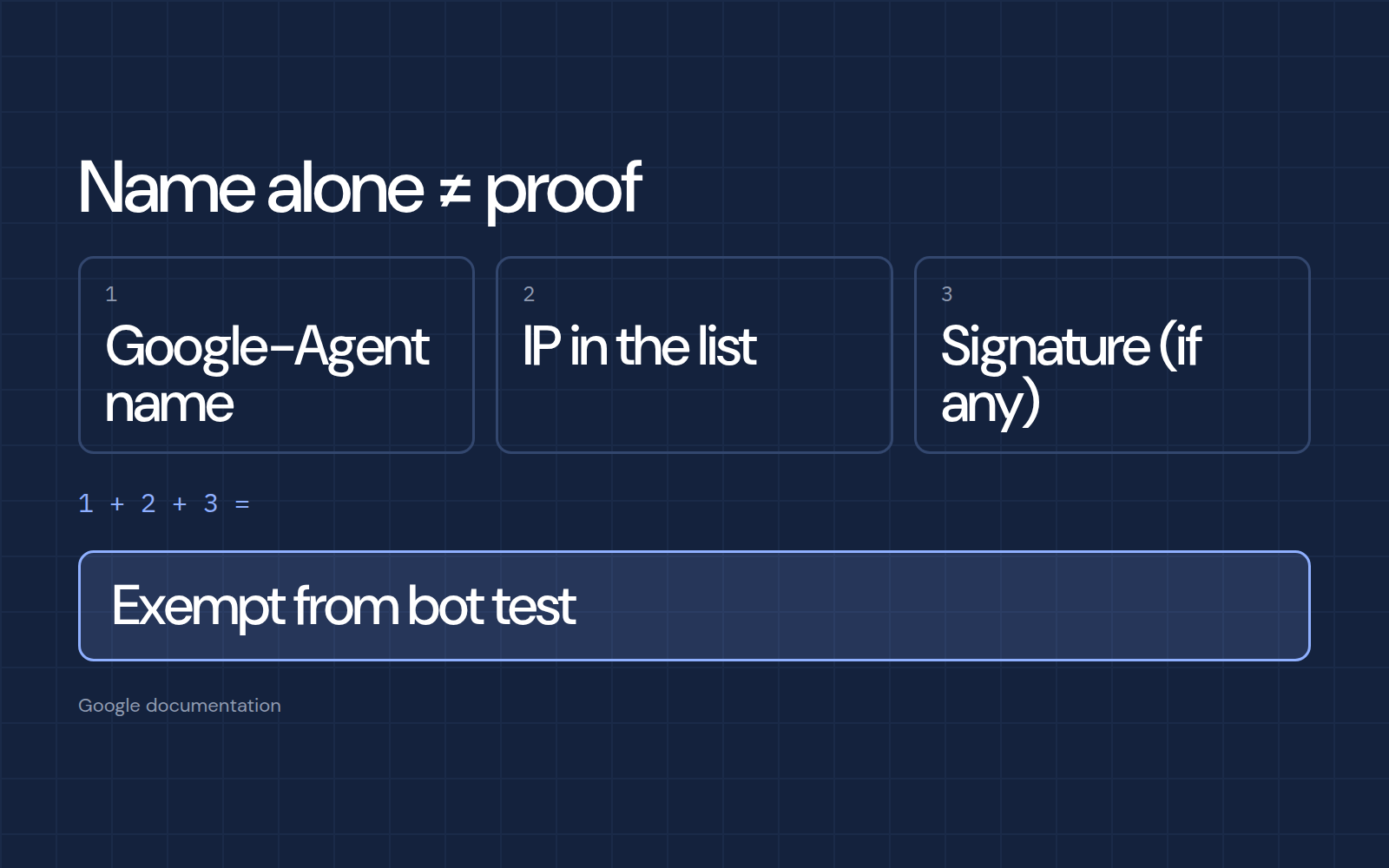
The GEO angle: the lever moves towards the technical side
A site can have excellent content, clean structured data and a good place in AI answers. It can still be unusable for an agent that has to act. If internal search shows an “I'm not a robot” test, or if stock is refused behind the scenes, the agent fails. The user who sent it will go elsewhere. I cannot quantify the effect: Google publishes nothing on volume or on the services concerned.
What I take from this: optimising “for agents” no longer starts with content. It starts with a simple question. Can the agent get in and finish its journey? That is a conversation to have between SEO, tech and security, before buying any visibility-tracking tool. Same logic as in my article on what to track instead of clicks: what matters plays out somewhere other than the usual curve.
What I would do on Monday morning
Search the server logs. Filter on “Google-Agent” over the last 30 days. Look at the responses: 200 (accepted), 403 (refused), 429 (too many requests), test pages. If there is no line at all, it is not necessarily a problem. Google does not say which services use the agent.
Replay a journey. Search, product page, cart, behind the firewall, from an allowed address. Note each background call. It is better to do this live with the technical team.
Fix the rule order first. Place the allow rule before the broad blocks. Widening exceptions without ordering them fixes nothing.
Automate the address list. Wire the rule to the user-triggered-agents.json file rather than copying ranges.
Do not allow on the name alone. Require the name and the address. Add the signature when your provider supports it.
Write down the decision. Someone must know why this rule exists. Otherwise it will be deleted at the next “security clean-up”.
Limits
I have not tested anything on a real site. I do not know how many sites are blocked today, or what share of traffic the agent represents. Google's documentation does not name the products that use Google-Agent. Its guide also does not say how to refuse the agent.
On dates: Google's changelog dates the guide's publication to 17 November 2026. The Google pages I read do not all carry a visible date. The signature is experimental: its rules may change. Finally, the number of ranges (20) is that of the file on the date of my reading, not a stable value.